How to Download and Use QR Codes from CrabQR
Learn how to download QR codes in high resolution and use them effectively. Export QR codes as PNG images and implement them in your marketing materials, products, or events.
Locate Your QR Code
Open CrabQR and navigate to the Management section to view all your QR codes displayed as cards in a grid layout. Each card shows a thumbnail preview of the QR code, its name, the short URL (https://crabqr.co/XXXXXX), creation date, and scan count. You can use the search bar to find specific codes by name, browse through folders, or filter by status. Click on the QR code card you want to download to view its full details.
Click Download Button
Once you've located your QR code, look for the Download icon
on the QR code card - it's usually represented by a downward arrow icon. You
can also open the QR code details by clicking the card, then find a more
prominent Download button in the details view. Click this
button to initiate the download process. If you're viewing a QR code preview
after creating it, the download option is available right after generation.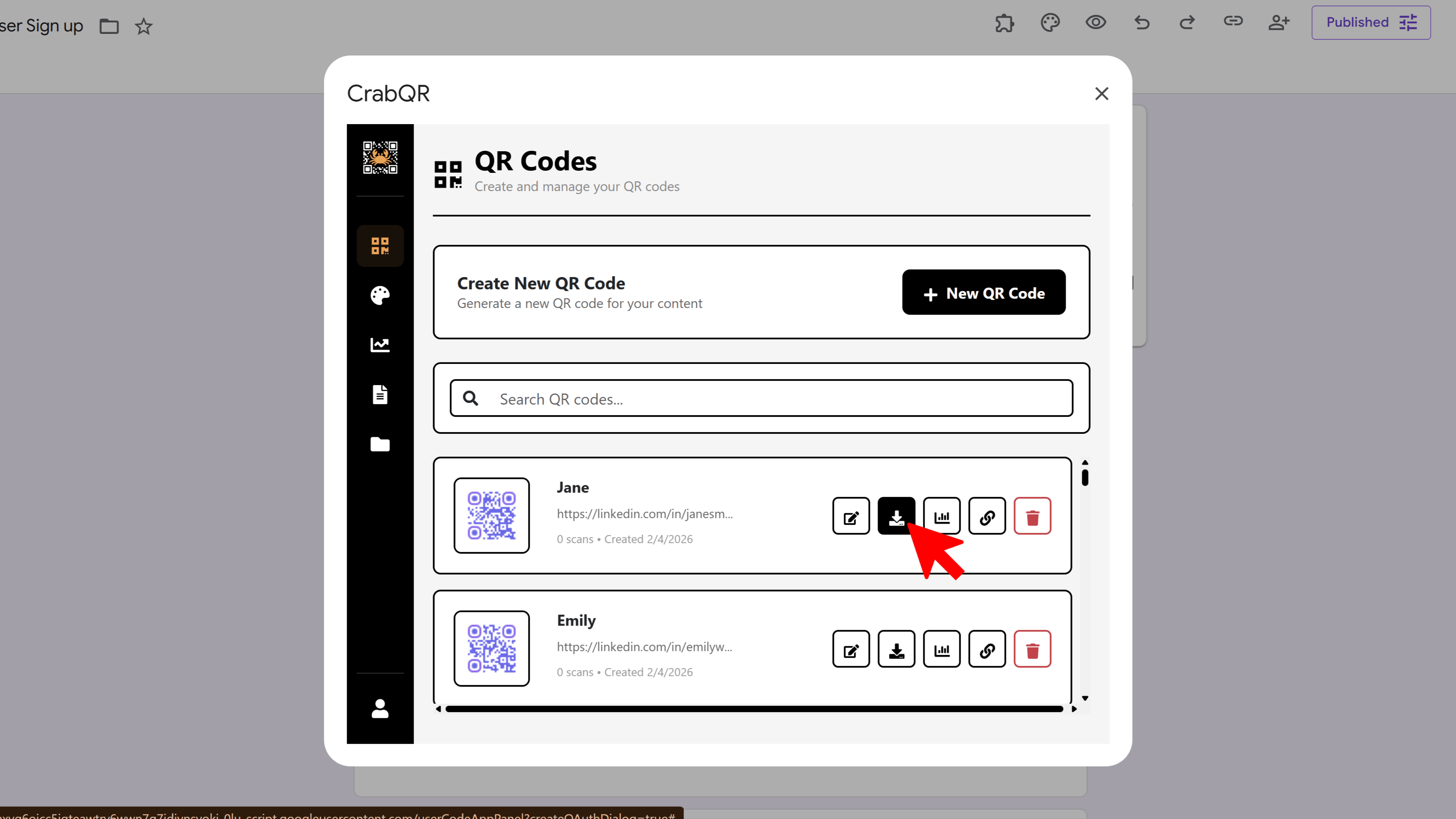
Save to Your Device
Click the Download button and your QR code will be downloaded as a PNG image file with a name like "crabqr-[name]-[code_id].png". The file will appear in your browser's default download location (usually the Downloads folder). If your browser asks for permission or where to save, approve the download and choose your preferred location. The PNG format ensures transparency and high quality, making it suitable for both digital and print use.
Print or Share Your QR Code
Now that your QR code is saved, you can use it anywhere. For printing, insert the image into your design software (Adobe Illustrator, Photoshop, Canva, etc.) or word processor. Ensure the QR code is not stretched or distorted - maintain its square aspect ratio. Leave adequate white space (quiet zone) around the QR code - at least 4-5 "pixels" of white space on all sides. For digital use, upload to your website, embed in emails, add to social media posts, or include in presentations. Always test the printed or displayed QR code by scanning it with multiple smartphones to verify it works before mass distribution.
Tips and Best Practices
- Test printed QR codes before mass production - scan from the actual printed material, not your screen preview.
- When printing, ensure your printer is set to "Actual Size" or "100%" - avoid "Fit to Page" which may distort the code.
- For large format printing (banners, posters), ensure high-quality output to prevent pixelation.
- Store your QR code files in an organized folder structure matching your CrabQR folders for easy access.
Common Pitfalls to Avoid
- Don't stretch or squish QR codes to fit spaces - they must remain perfectly square to scan properly.
- Avoid printing QR codes smaller than 1x1 inch (2.5x2.5 cm) - they become difficult for smartphones to scan.
- Don't place QR codes on curved, reflective, or textured surfaces that might interfere with scanning.
- Never compress QR code images (especially as JPEG) for reuse - this introduces artifacts that can break scanning.
- Don't forget the quiet zone (white space border) - QR codes need this margin to be detected by scanners.
CrabQR: QR Code Generator & Analytics
Create, customize, and track QR codes with advanced styling, landing pages, and comprehensive analytics. Perfect for marketing and event management.
- Dynamic QR code generation
- Advanced styling & customization
- Custom landing pages
- Real-time scan analytics
- Bulk QR code creation
- Built right into Google Workspace