How to Make Google Forms Anonymous
Learn how to ensure anonymity in Google Forms by turning off email collection and avoiding common pitfalls.
- Open your Google Drive
- Create a new form
- Create your form
- Turn off email collection
- Tips and Best Practices
- Common Pitfalls to Avoid
- External Resources
Open your Google Drive
Go to www.drive.google.com. Make sure you're signed in to your Google account.
Create a new form
Click on 'New' on the left-hand side of the screen and then select 'Google Forms'. You will be redirected to a new window where you can create your form.
Create your form
Type your questions, and select the type of responses you want. You can add multiple questions to your form.
Turn off email collection
By default, Google Forms will collect email addresses from respondents. To make your form anonymous, you need to turn this off. Click on the settings icon (looks like a gear) in the top-right corner of the screen. A new window will open.
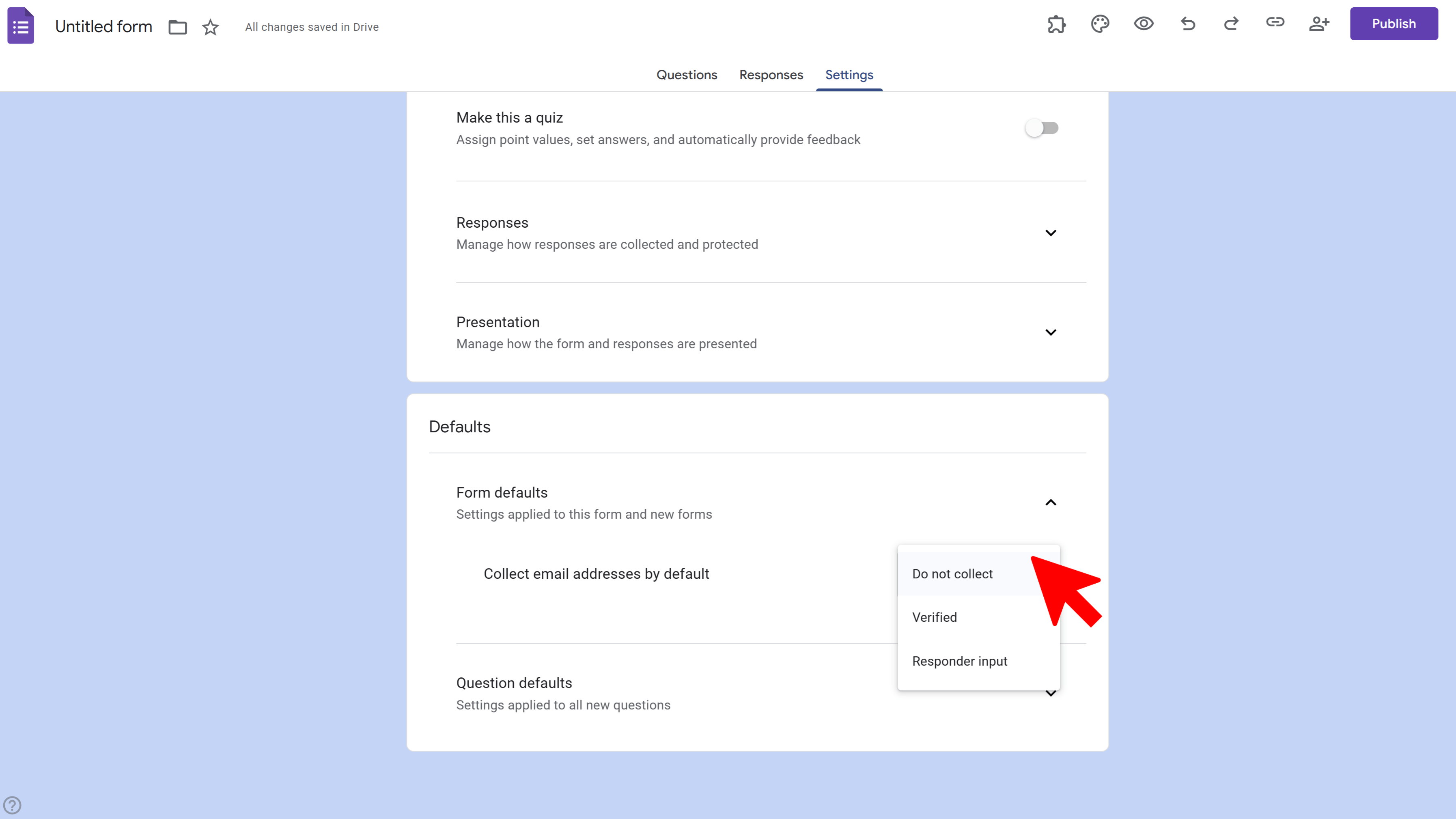
In this new window, uncheck the box that says 'Collect email addresses'. This will make sure that Google does not collect any email addresses from the people who fill out your form.
Tips and Best Practices
Before you distribute your form, double-check that 'Collect email addresses' is turned off. This is the only way to ensure that responses are anonymous.
If you want to collect some information about respondents (like their age or location), but still keep their responses anonymous, you can add questions for these details in your form. Just make sure not to ask for any identifying information.
Remember that even if you don't collect email addresses, responses may still be traced back to respondents if they are logged into their Google account when they fill out the form. If absolute anonymity is crucial, consider using a different survey tool.
Common Pitfalls to Avoid
Forgetting to turn off email collection. This is the most common mistake that makes Google Forms not anonymous.
Asking for identifying information in the form. Even if you don't collect email addresses, your form won't be anonymous if you ask for names, phone numbers, or other identifying details.
External Resources
Official Google Forms User Guide: Google Forms Help
Relevant Forums: Google Support Community
Tools and Software Recommendations: Google Forms is available as part of Google Workspace, a suite of productivity tools that also includes Google Docs, Sheets, Slides, and more. You can sign up for a free Google account to use Google Forms. If Google Forms doesn't meet your needs for anonymous surveys, consider using a tool like SurveyMonkey or Typeform.
BeeForm: Pretty Forms Designer
Transform Google Forms into beautiful, branded, and highly customizable web forms. Apply advanced styling, manage responses, and collaborate.
- Custom Branding & Layouts
- Advanced Design Controls
- Response Limits & Email Notifications
- Preset & Custom Themes
- Team Collaboration
- Built right into Google Forms